PremiumInvite-only
AE Volume Profile
Volume profiles that measure which levels have held on your chart – and how likely price reaches each one before the period ends.
- 30 days free
- No payment details
- Nothing to cancel
Tested
Tested on 30 market and timeframe combinations
Forex, stock indices, metals, oil, crypto and stocks on 15 minutes, 1 hour and 4 hours, all with default settings. Every chance was stated before the outcome and checked after the period had ended.
- combinations where stated and actual chances were within 5 points
- 28 of 30
- held-out combinations where price traded more often at the previous POC than at a comparable price
- 17 of 20
- combinations where price traded more often at the previous POC than at the mirror price
- 26 of 30
- chances checked against what price actually did
- 40,111
Rounded values from the author’s tests. On your own chart, the dashboard measures the same rates live. Past results are no guarantee of future results.
Before / after
Same chart. Now with AE Profile.
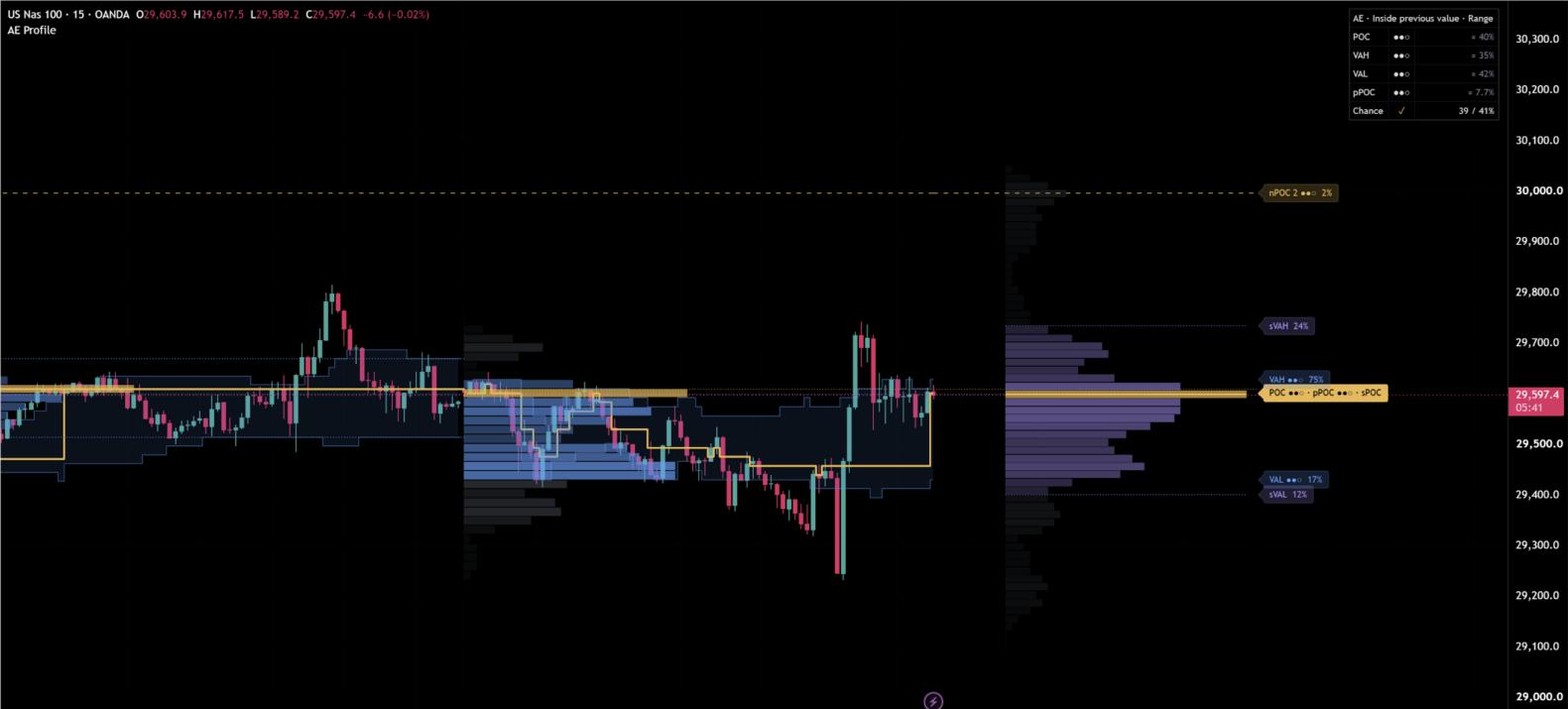

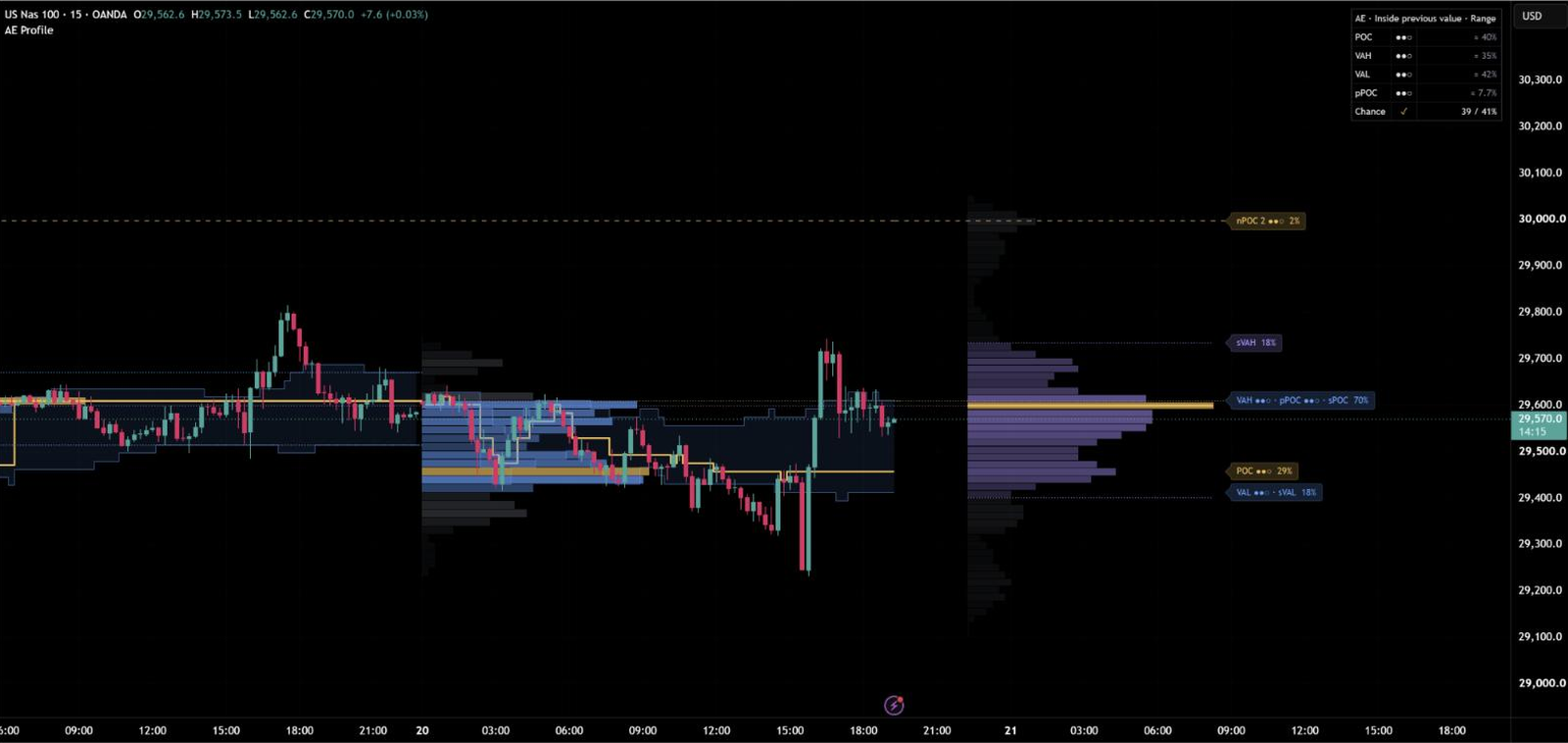
AE Volume Profile draws a volume profile for every session, week, month or quarter, plus a profile of the move that is running now – and measures on your chart which of its levels have actually mattered. POC, value area high and value area low carry their measured quality, and every level shows how often price has reached such a distance before the period ended. So you see not only where volume traded, but which levels deserve your attention and which are realistic targets for the rest of the session.
Volume profiles at a glance
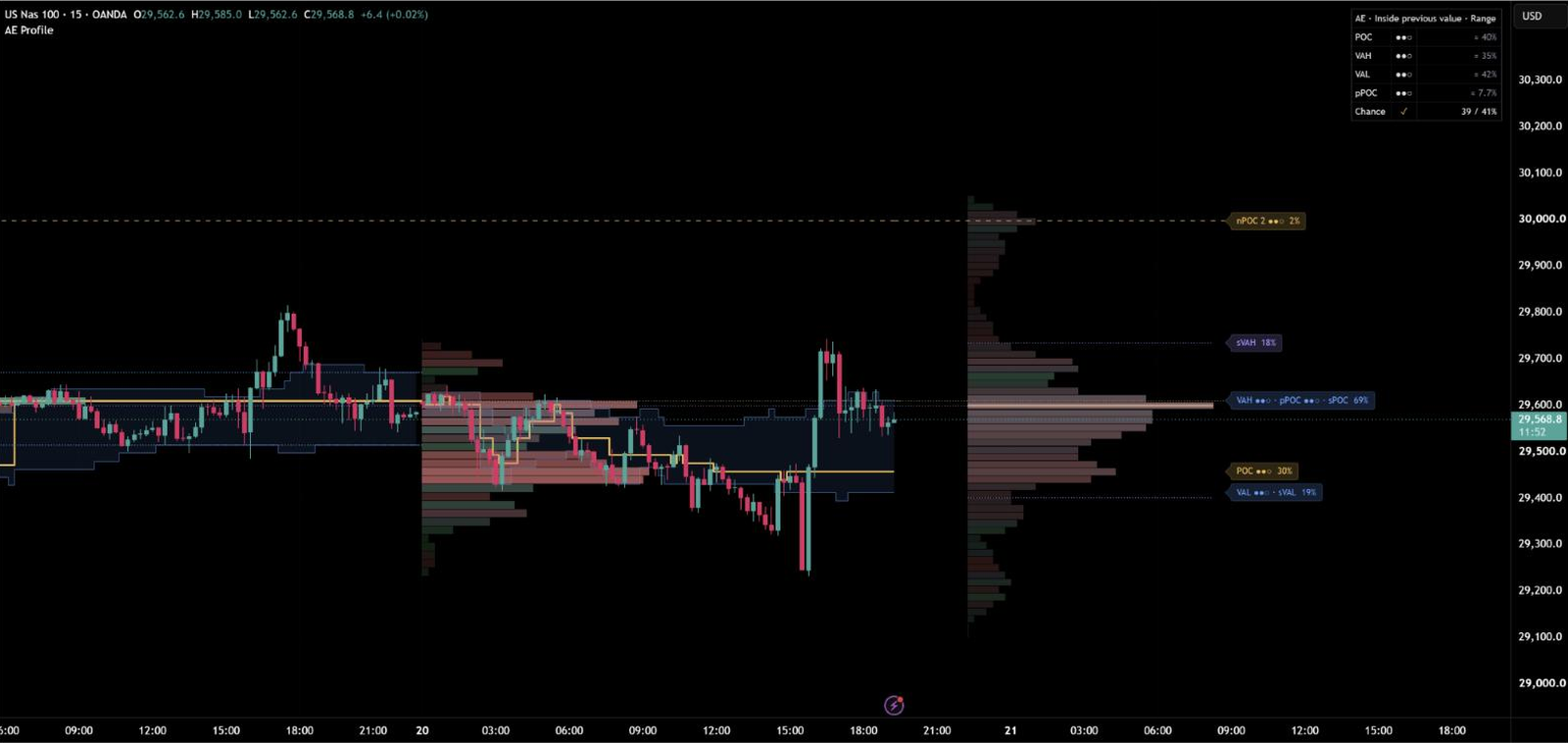
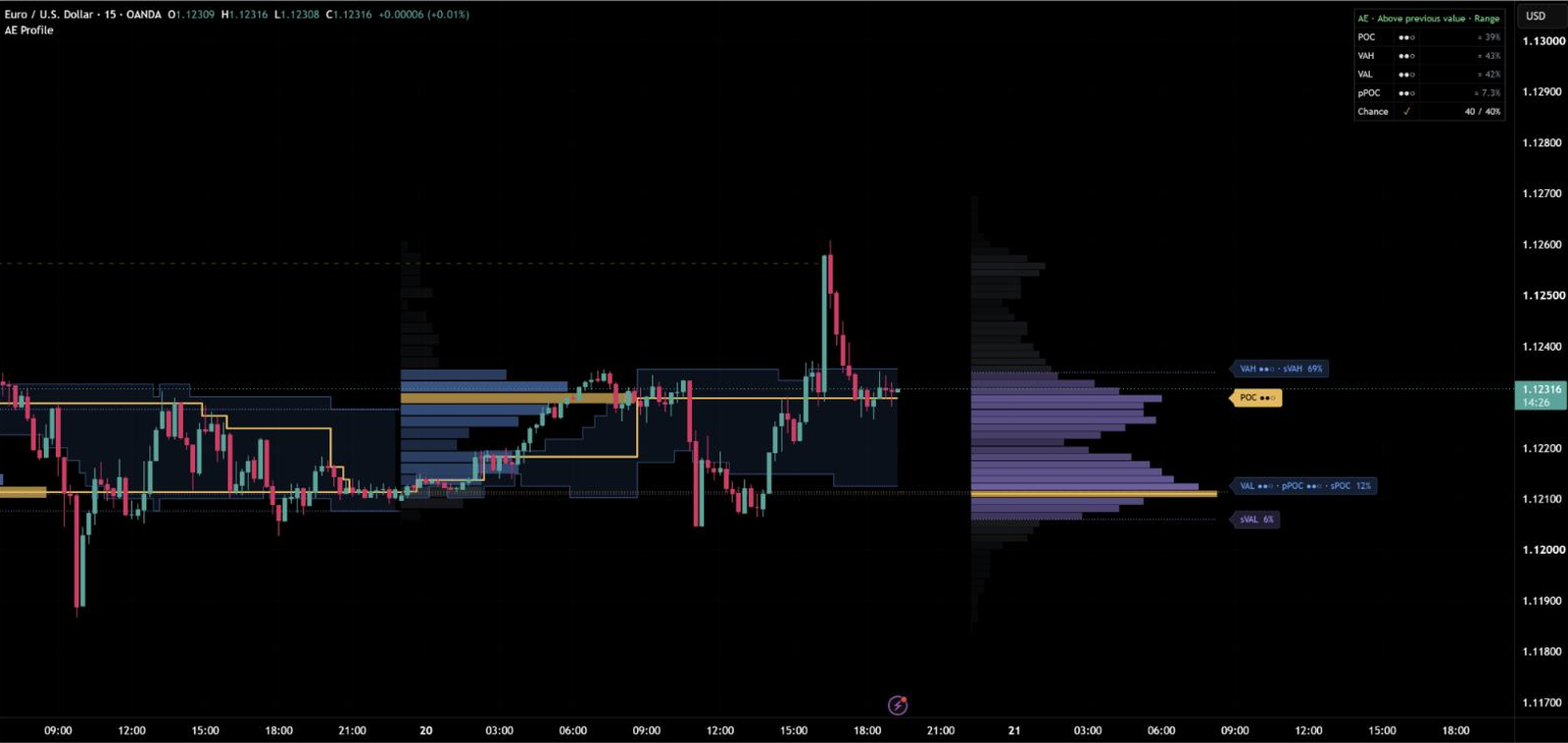
Every period gets its own profile, growing live from its first candle. Rows inside the value area are blue, the POC row is gold, the rest is grey – and the more volume a row holds, the stronger its colour, so the shape reads at a glance. Up to 10 finished profiles stay on the chart.
Next to the profiles you see how value develops: a gold step line for the developing POC and a soft band for the developing value area, candle by candle. Auto picks the period for your timeframe – sessions up to 15 minutes, weeks up to 4 hours, months on the daily chart.

Level quality – measured on your chart
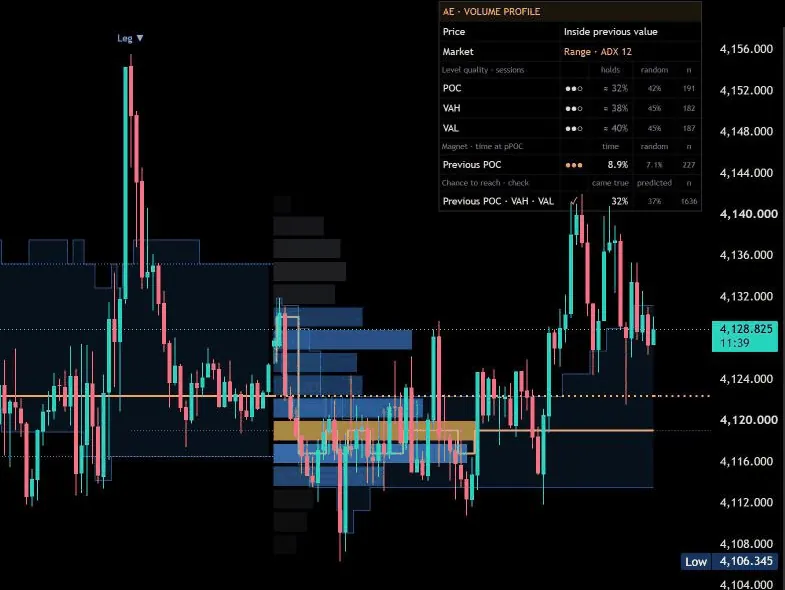
Most volume profiles assume that the POC and the edges of the value area matter. AE Volume Profile measures it. For every finished period it follows POC, VAH and VAL to their first touch and checks whether price turned there – and runs exactly the same test at nearby prices without any volume meaning. The result is shown as dots:
- ●●● – this kind of level held clearly more often than nearby prices on this chart, confirmed in two separate samples, so a lucky streak alone never earns three dots
- ●●○ – held about as often as nearby prices
- ●○○ – held less often than nearby prices
Lines and tags follow the grade: ●●● levels are drawn bold and solid, so the levels that have worked on your market stand out without any extra work. A second check measures the pull of the previous POC – how much of the time price traded there, compared with a price at the same distance on the other side of the open.
Chance to reach – realistic targets for the period
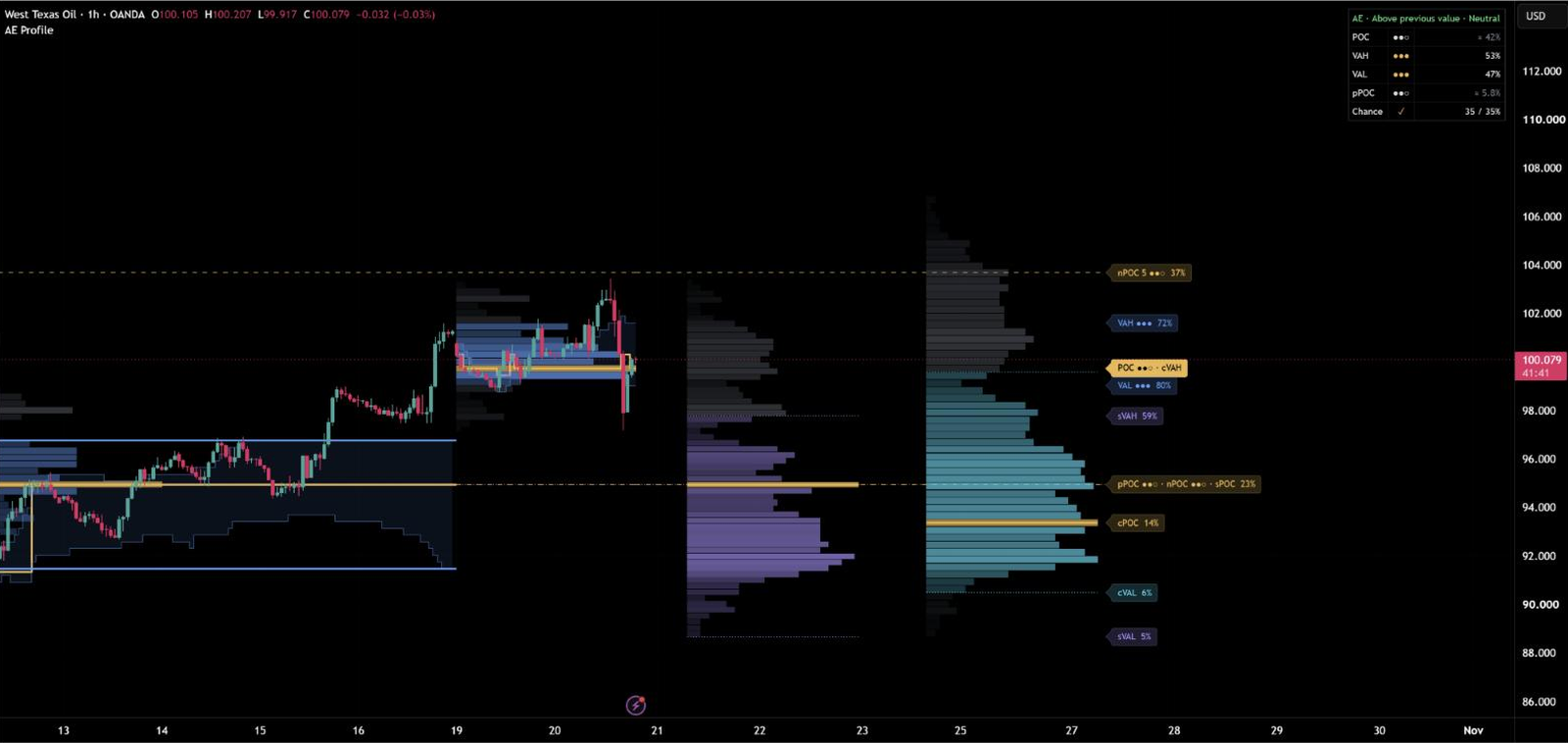
Next to every tag sits a percentage, for example “VAH ●●○ 70%” or “nPOC 2 2%”: how often, on this chart, price has traded at a level this far away before the period ended – with as much of the period left as now. It updates with every candle. A level with a high percentage is a realistic target for the rest of the period, one with a low percentage needs an unusually large move.
The indicator checks these numbers itself: at a quarter, half and three quarters of every period it records the chance for the previous POC, VAH and VAL and later compares it with what actually happened. The dashboard shows came true next to predicted – with ✓ when both agree.

The move that is running now
Right of price, a second profile shows all volume since the current move began – the structure leg, found with the same swing and break logic as AE Market Structure. Its POC and value area (sPOC, sVAH, sVAL) show which prices the current move has accepted, and its low volume nodes mark thin areas that price has moved through quickly. In Trend mode the profile covers the whole current trend.
On request, a composite profile combines the last periods into one (cPOC, cVAH, cVAL) – next to the structure leg or instead of it.
Previous POC and naked POCs
The POC of the previous period (pPOC) runs as a dotted line through the running period, drawn by its measured pull. Naked POCs – POCs of earlier periods that price has not traded at since – run on to their tag until price reaches them and then end at that candle. Levels far outside the recent range stay hidden until price comes closer, so the chart stays clean.
The market state from the ADX is part of the picture: in trend phases the lines of the previous POC and the naked POCs are drawn fainter automatically, so you see at a glance whether the market is ranging or trending.
Value area or Delta
Two styles for the rows: Value area (default) colours the value area blue and the POC gold. Delta colours every row from red (selling) to green (buying), estimated from where each candle closed within its range, and stronger with more volume.
Every candle is split into its lower timeframe candles, and their volume is spread over the prices they actually traded at – 1-minute data up to the 15-minute chart, 5 minutes up to 1 hour, 1 hour up to 4 hours.
Results of the author’s tests
Tested with default settings on 30 market and timeframe combinations – forex, stock indices, metals, oil, crypto and stocks on 15 minutes, 1 hour and 4 hours.
- Chance to reach: across 40,111 checked predictions, the stated chances averaged 35.0% and 33.7% came true. On 28 of the 30 combinations, predicted and actual differed by at most 5 points.
- Previous POC magnet: on 20 combinations that were held out while the test was designed, price traded at the previous POC on 10.1% of the candles of a period, compared with 9.6% at a comparable price – ahead on 17 of the 20.
- Previous POC magnet on all 30 combinations: price traded at the previous POC on 9.75% of the candles of a period, compared with 9.05% at the mirror price – ahead on 26 of the 30. Nearby prices and the middle of the previous range showed far less pull.
- No repainting: profiles, levels, statistics and alerts verified candle by candle in Bar Replay.
On your own chart, the dashboard runs the same measurements live.
Repainting
Finished profiles, levels, statistics and alerts are based on closed candles, and the average period range uses finished periods only. Developing POC and value area values never change once their candle has closed. The running profile and the profiles right of price update with the current candle, like every developing profile. Verified candle by candle in Bar Replay and on live charts.
Alerts
Switch on the alerts you want in the Alerts section, then create one alert with the condition “AE Profile” and “Any alert() function call”. Available: previous POC, VAH or VAL touched (first touch in the running period), naked POC reached, close outside the previous value area, and back into value – price opened outside the previous value area and has closed back inside it for 30 minutes. With “Only levels with ●●●” (on by default), touch alerts fire only for the kinds of level that held clearly more often than nearby prices on your chart. All alerts fire once per closed candle.
Settings guide
The menu has seven clearly named groups. You don’t need to change anything to start – the defaults are the setup the tests ran with.
Quick setups
- Phone: Dashboard → Layout Compact.
- Weekly profiles on an intraday chart: Profile → Period Week.
- Buying and selling: Profile → Profile style Delta.
- Composite profile: Right of Price → Profile Composite or Both.
- Alerts at the strongest levels: Alerts → Previous POC / VAH / VAL touched, with “Only levels with ●●●”.
Section by section
Open a section for its main settings. In TradingView, every setting also explains itself behind the ⓘ icon.
01 · Profile
Period: Auto (default), Session, Week, Month or Quarter. Profiles on chart: how many finished profiles stay on the chart (default 5, up to 10). Profile style: Value area or Delta.
02 · Levels
POC and value area lines, naked POCs (the 8 most recent), developing POC and value area, level tags, chance to reach and tag size.
03 · Right of Price
Profile right of price: Structure leg (default), Composite, Both or Off. Start: Leg or Trend. Structure length (default 50 candles on each side), composite periods (default 10) and low volume nodes.
04 · Candles
Optional candle colours in your up and down colour – full colour outside the previous value area, faded inside.
05 · Dashboard
On or off, position (default Bottom Right) and text size. Layout: Full with all numbers, or Compact for phones and small screens. Hover over any line for a short explanation.
06 · Alerts
Previous POC / VAH / VAL touched, naked POC reached, close outside value and back into value. “Only levels with ●●●” limits touch and naked POC alerts to the levels that held clearly more often on your chart.
07 · Colors
Colour scheme Auto, Dark or Light, and colours for value area, POC, composite, buying, selling and structure.
Markets and timeframes
Works on forex, indices, stocks, metals, energy and crypto, from 1 minute to the weekly chart. Tested with default settings on 30 market and timeframe combinations from 15 minutes to 4 hours, and checked candle by candle in Bar Replay. AE Volume Profile works on its own and combines naturally with AE Market Structure – the structure leg profile uses the same break logic.
Tips for the best results
- Start with the dots: ●●● levels have held on your market – give them the most weight.
- Use the percentage for targets: a level with a high chance to reach is a realistic goal for the rest of the period.
- Watch the edges of the value area: a close outside the previous value area shows the market moving away from accepted prices, a close back inside shows it returning.
- Watch the previous POC: on most markets price came back to it more often than to comparable prices – the dashboard shows how strong this pull is on your chart.
- Combine it with AE Market Structure: direction from the structure, levels and targets from the profile.
- On a phone, switch the dashboard to Compact so the chart keeps more room.
Every number is measured on the chart you are looking at – so you see which volume levels really matter on your market.
Real reviews
What traders say about AE Profile
No reviews yet. Are you using AE Profile? Be the first to share your experience.
Write a review
Only real people: every review is confirmed by email and checked by hand before it appears.
Changelog
What changed in each version.
v1.2
Cleaner settings: seven clearly named groups – Profile, Levels, Right of Price, Candles, Dashboard, Alerts and Colors. Rows, value area, precision, profile width and offset run on the tested values. Calculations and results are unchanged.
v1.1
Fairer level quality: comparison prices now sit 40% of an average period range from each level, and ●●● or ●○○ need more than three standard errors.
v1.0
First release: period profiles with POC, value area and developing levels, level quality from the built-in self-check, chance to reach for every level, structure leg and composite profiles, naked POCs, Delta style, dashboard and alerts.
Updates
Get notified about updates
One email when AE Volume Profile gets a new version – what changed and how to get it. Nothing else.